
Skills System
Skills are the core building blocks of FundAdmin AI. Each skill is a Markdown file that instructs Claude Code how to handle a specific /fund command. This page explains how skills are structured, how command routing works, and how the 59 skills are organized.
What Is a SKILL.md File?
A SKILL.md file is a Markdown document that acts as a declarative instruction set for Claude Code. When a user types a command like /fund review-lpa, Claude Code loads the corresponding SKILL.md file and follows its instructions to process the user's input and generate structured output.
Skills are not code -- they are natural language instructions enhanced with structured sections that Claude's language model interprets and executes. This design means skills can be updated, extended, and customized without writing or compiling any software.
Each skill lives in its own directory:
skills/fund-<command-name>/SKILL.mdFor example:
skills/fund-review-lpa/SKILL.md
skills/fund-draft-capital-call/SKILL.md
skills/fund-check-compliance/SKILL.md
Anatomy of a Skill File
Every SKILL.md file follows a consistent structure with these sections:
1. YAML Frontmatter
---
name: fund-review-lpa
description: Comprehensive LPA review with 5 parallel agents and LPA Safety Score
command: /fund review-lpa
---
The frontmatter provides metadata that the orchestrator uses for command routing and help text generation.
2. Role Description
A concise statement defining the skill's identity and expertise:
You are a senior fund administration analyst specializing in Limited Partnership Agreement review. You have 20+ years of experience reviewing LPAs for institutional investors and understand market-standard terms across PE, VC, hedge fund, real estate, and credit fund structures.
This grounds Claude's behavior in the appropriate domain expertise.
3. "When This Skill Is Invoked" Section
Defines the trigger conditions and expected inputs:
- What command activates this skill
- What input types are accepted (file path, pasted text, JSON, URL)
- What happens when input is missing or malformed
- Prerequisites (e.g., "requires a document as input")
4. Multi-Phase Processing Workflow
The core of every skill -- a step-by-step workflow that Claude follows:
Phase 1: Ingestion
- Read and parse the input document
- Extract full text content
- Classify document type and fund type
- Identify key metadata (fund name, parties, dates, jurisdiction)
Phase 2+: Analysis (varies by skill)
- Perform the skill's specific analysis
- Apply relevant frameworks, checklists, or criteria
- Assign risk ratings to findings
- Cross-reference against standards or benchmarks
Final Phase: Output
- Format results using the specified template
- Apply file naming convention
- Include all required sections (summary, findings, recommendations, disclaimer)
- Write the output file
5. Input Handling
Skills accept multiple input formats and handle each appropriately:
| Input Type | Handling |
|---|---|
| File path | Read the file directly (PDF, DOCX, TXT supported) |
| Pasted text | Analyze the pasted content as the document |
| URL | Fetch and parse the linked document |
| Prior command output | Use the output from a previous /fund command as input |
| JSON/CSV data | Parse structured data for generation commands |
6. Output Format Specification
Defines the exact structure of the output, including:
- Section headings and their order
- Table formats and column definitions
- Risk indicator conventions (high / medium / low)
- Scoring methodology (where applicable)
- File naming convention:
TYPE-[identifier]-[YYYY-MM-DD].md
7. Error Handling Table
Each skill includes error handling for common failure scenarios:
| Scenario | Handling |
|---|---|
| No input provided | Prompt the user for the required input |
| Unreadable file format | Inform the user of supported formats (PDF, DOCX, TXT) |
| Document too short | Warn that the document may be incomplete and proceed with available content |
| Wrong document type | Notify the user (e.g., "This appears to be a PPM, not an LPA. Proceeding with PPM-appropriate analysis.") |
| Missing sections | Flag missing sections in the output and note which analyses could not be performed |
| Ambiguous fund type | Ask the user to confirm the fund type or proceed with best-guess classification |
8. Disclaimer
Every skill's output includes the standard fund administration disclaimer:
This analysis is generated by AI and is intended for informational purposes only. It does not constitute legal, financial, tax, or investment advice. All findings should be reviewed by qualified professionals before being relied upon for decision-making.
How Command Routing Works
Command routing is handled by the orchestrator file at fund/SKILL.md:
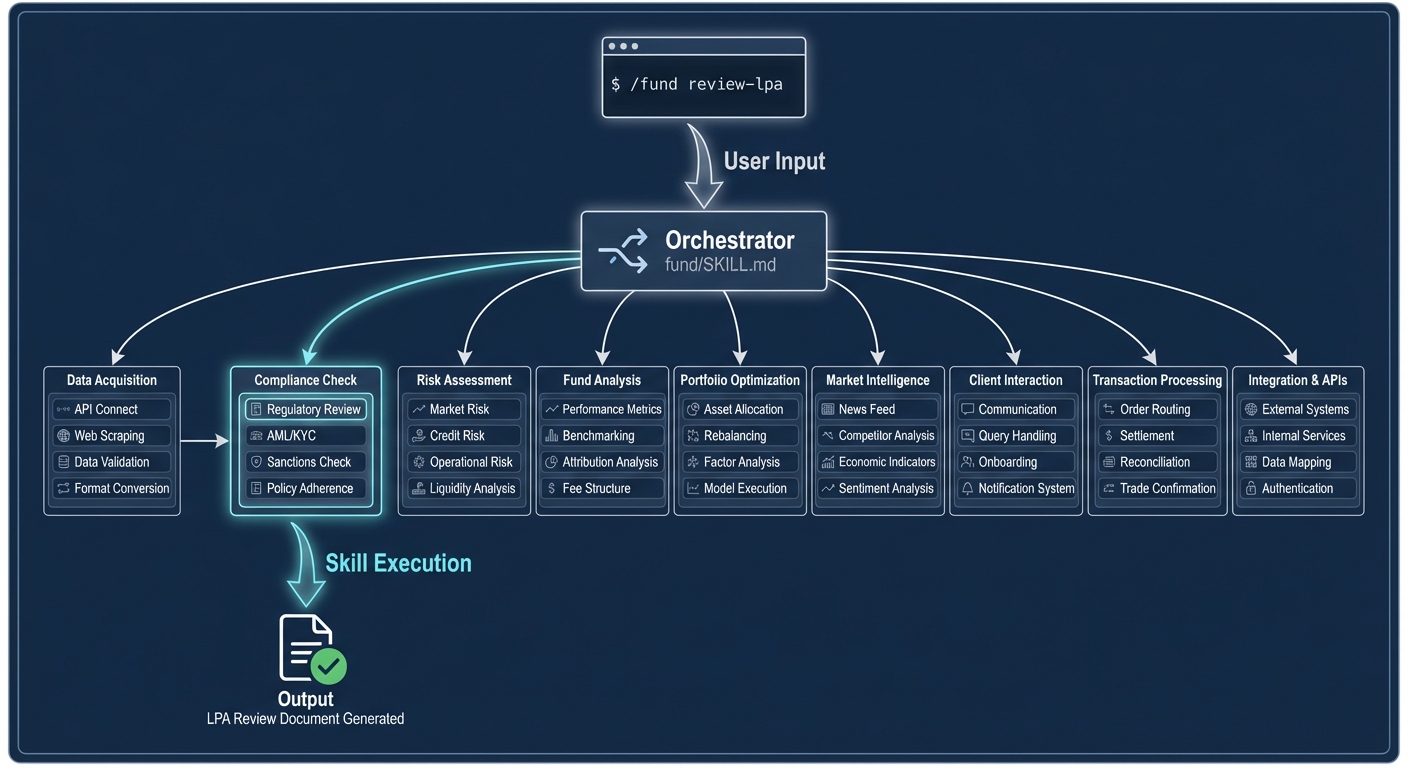
The routing flow:
- User types
/fund review-lpa greenfield-lpa.pdf - Orchestrator (
fund/SKILL.md) parses the command and matches against 59 routes - Loads the matched skill file (
skills/fund-review-lpa/SKILL.md) - Skill follows its multi-phase workflow and generates structured output
- Result written to
LPA-REVIEW-greenfield-2026-04-03.md
The orchestrator maintains a complete routing table mapping each command name to its skill directory. If a command is not recognized, the orchestrator displays the help text with all available commands.
Skill Categories
FundAdmin AI's 59 skills are organized into 14 categories:
1. Document Review (12 skills)
| Skill | Command | Purpose |
|---|---|---|
| fund-review-lpa | /fund review-lpa | Flagship LPA review with 5 parallel agents and LPA Safety Score |
| fund-review-ppm | /fund review-ppm | PPM review covering risk factors, fees, and regulatory status |
| fund-review-subscription | /fund review-subscription | Subscription document review with investor qualification checks |
| fund-review-side-letter | /fund review-side-letter | Side letter analysis with MFN triggers and LPA conflict detection |
| fund-review-capital-call | /fund review-capital-call | Capital call notice review with ILPA compliance checks |
| fund-review-distribution-notice | /fund review-distribution-notice | Distribution notice review with waterfall and tax verification |
| fund-review-capital-account | /fund review-capital-account | Capital account statement review with reconciliation |
| fund-review-k1 | /fund review-k1 | K-1 review with UBTI, ECI, and allocation analysis |
| fund-review-poa | /fund review-poa | Power of attorney review for fund administration contexts |
| fund-review-gp-update | /fund review-gp-update | GP update letter review with commitment and milestone tracking |
| fund-compare | /fund compare | Side-by-side document comparison with material change highlighting |
| fund-extract-terms | /fund extract-terms | Key term extraction with defined terms glossary |
2. Document Generation (4 skills)
| Skill | Command | Purpose |
|---|---|---|
| fund-draft-capital-call | /fund draft-capital-call | ILPA-compliant capital call notices with per-LP calculations |
| fund-draft-distribution | /fund draft-distribution | Distribution notices with waterfall summary and tax withholding |
| fund-draft-investor-letter | /fund draft-investor-letter | Investor letters (quarterly, annual, onboarding, ad-hoc, closing) |
| fund-draft-side-letter | /fund draft-side-letter | Side letter drafting with customizable provision types |
3. Compliance & Regulatory (3 skills)
| Skill | Command | Purpose |
|---|---|---|
| fund-check-compliance | /fund check-compliance | Multi-framework compliance: FATCA, CRS, AML/KYC, ERISA, AIFMD, SFDR |
| fund-kyc-review | /fund kyc-review | KYC review with identity verification, beneficial ownership, sanctions |
| fund-regulatory-filing | /fund regulatory-filing | Filing prep for Form PF, Form D, Form ADV, FATCA/CRS, Form 13F, FBAR |
4. Analysis & Reporting (3 skills)
| Skill | Command | Purpose |
|---|---|---|
| fund-audit-support | /fund audit-support | Audit support packages with confirmations, schedules, workpapers |
| fund-waterfall-review | /fund waterfall-review | Distribution waterfall validation with hurdle, catch-up, clawback |
| fund-report-pdf | /fund report-pdf | Professional PDF generation with score gauges and risk charts |
5. Negotiation & Strategy (4 skills)
| Skill | Command | Purpose |
|---|---|---|
| fund-lpa-negotiate | /fund lpa-negotiate | Negotiation strategy with redlines, counter-proposals, P0-P4 priority |
| fund-benchmark | /fund benchmark | Market benchmark comparison for fees, carry, governance terms |
| fund-plain-english | /fund plain-english | Clause-by-clause legalese translation with risk flags |
| fund-playbook | /fund playbook | Terms evolution analysis across vintages with drift and leverage |
6. Tracking & Monitoring (4 skills)
| Skill | Command | Purpose |
|---|---|---|
| fund-mfn-tracker | /fund mfn-tracker | MFN election tracking with eligibility, cascade risks, election forms |
| fund-obligation-tracker | /fund obligation-tracker | Obligation inventory with deadlines, compliance status, exam-ready logs |
| fund-covenant-monitor | /fund covenant-monitor | Debt covenant monitoring with headroom, breach alerts, cross-default |
| fund-regulatory-calendar | /fund regulatory-calendar | 12-month filing calendar for all major regulatory deadlines |
7. Analytics & Modeling (4 skills)
| Skill | Command | Purpose |
|---|---|---|
| fund-performance-calc | /fund performance-calc | IRR, TVPI, DPI, RVPI, MOIC, PME, and J-curve calculations |
| fund-cashflow-forecast | /fund cashflow-forecast | Yale Model (Takahashi-Alexander) quarterly cash flow projections |
| fund-scenario-model | /fund scenario-model | Base/downside/upside scenario modeling with waterfall impact |
| fund-fee-audit | /fund fee-audit | Comprehensive fee verification across management, carry, and offsets |
8. Investor & Operations (4 skills)
| Skill | Command | Purpose |
|---|---|---|
| fund-investor-onboard | /fund investor-onboard | Onboarding workflows for individual, entity, ERISA, trust, non-US |
| fund-ddq-respond | /fund ddq-respond | ILPA DDQ response drafting with AI-generated answers and scoring |
| fund-entity-map | /fund entity-map | Entity structure visualization with Mermaid diagrams and ownership |
| fund-data-room | /fund data-room | ILPA-compliant data room setup with folder structure and access tiers |
9. Portfolio Intelligence (3 skills)
| Skill | Command | Purpose |
|---|---|---|
| fund-portfolio-dashboard | /fund portfolio-dashboard | Portfolio-wide dashboard with NAV, IRR, and fund-level roll-up |
| fund-reconcile | /fund reconcile | Capital account and position reconciliation across admin records |
| fund-review-deed | /fund review-deed | Deed of adherence review for new LP admissions |
10. Investor Compliance & Onboarding (6 skills)
| Skill | Command | Purpose |
|---|---|---|
| fund-investor-classify | /fund investor-classify | Investor classification (accredited, qualified purchaser, professional) |
| fund-fatca-crs-classify | /fund fatca-crs-classify | FATCA/CRS entity classification with withholding determination |
| fund-suitability-check | /fund suitability-check | Investor suitability review against fund mandate and restrictions |
| fund-aml-screen | /fund aml-screen | AML screening with sanctions, PEP, and adverse media checks |
| fund-kyc-tracker | /fund kyc-tracker | KYC expiry tracking and re-verification scheduling |
| fund-subscription-process | /fund subscription-process | End-to-end subscription processing workflow |
11. Document Intake (2 skills)
| Skill | Command | Purpose |
|---|---|---|
| fund-ingest | /fund ingest | Ingest raw documents (PDF, DOCX, TXT) and route into the review lifecycle |
| fund-ingest-email | /fund ingest-email | Ingest email attachments and extract fund documents for review |
12. Knowledge Management (2 skills)
| Skill | Command | Purpose |
|---|---|---|
| fund-vault-init | /fund vault-init | Initialize Obsidian vault with dashboards, Kanban boards, and templates |
| fund-vault-sync | /fund vault-sync | Sync review outputs to vault with YAML frontmatter, tags, and backlinks |
13. Advanced (4 skills)
| Skill | Command | Purpose |
|---|---|---|
| fund-multi-doc-analyze | /fund multi-doc-analyze | Cross-reference analysis across multiple documents with conflict detection |
| fund-smart-contract-sim | /fund smart-contract-sim | Waterfall simulation as programmable logic with execution traces |
| fund-chat | /fund chat | Conversational mode for natural language queries with citations |
| fund-amendment-draft | /fund amendment-draft | Amendment drafting with track changes, recitals, common amendment types |
14. ESG, Tax & Specialized (4 skills)
| Skill | Command | Purpose |
|---|---|---|
| fund-esg-report | /fund esg-report | ESG reporting: SFDR, TCFD, EDCI, UN PRI, EU Taxonomy |
| fund-tax-review | /fund tax-review | Tax document review: K-1, UBTI, ECI, Section 199A, withholding |
| fund-board-memo | /fund board-memo | Board/LPAC memo generation with performance, conflicts, resolutions |
| fund-wire-verify | /fund wire-verify | Payment anomaly detection with FATF screening and risk classification |
Installation Location
When installed, skills are copied to the Claude Code skills directory:
~/.claude/skills/fund-review-lpa/SKILL.md
~/.claude/skills/fund-review-ppm/SKILL.md
~/.claude/skills/fund-draft-capital-call/SKILL.md
... (one directory per skill)
The install.sh script handles copying all 59 skill files and 5 agent files to the correct locations. The uninstall.sh script removes them.
Skill Execution Model
Skills are stateless -- each invocation is independent. A skill does not remember prior invocations or maintain session state between commands. However, skills can reference the output of prior commands when the user provides that output as input.
Skills are deterministic in structure -- the same type of input always produces the same output structure (sections, tables, headings). The analytical content varies based on the document being analyzed.
Skills are composable -- users can chain commands together. For example:
# Step 1: Extract terms
/fund extract-terms greenfield-lpa.pdf

# Step 2: Benchmark those terms
/fund benchmark greenfield-lpa.pdf

# Step 3: Generate negotiation redlines
/fund lpa-negotiate greenfield-lpa.pdf
Skill Output Flow
After a skill generates its Markdown report, the output can flow into the Obsidian Vault for persistent storage and review tracking:
Skill execution
  → Review file written to disk (e.g., LPA-REVIEW-greenfield-2026-04-03.md)
  → MCP Vault Server (vault_write_review)
  → Obsidian Vault (~/FundAdmin-AI-Vault/)
  → Kanban Board (vault_add_kanban_card)
  → Review enters lifecycle: new → under-review → action-required → completed → archived
The MCP Vault Server exposes 15 tools via the Model Context Protocol (stdio transport). Install it with:
claude mcp add fundadmin-vault -s user node mcp-vault-server/index.jsKey tools for the output flow:
| Tool | Purpose |
|---|---|
vault_write_review | Create a review note with YAML frontmatter in the vault |
vault_add_kanban_card | Add the review to the Kanban board |
vault_move_kanban_card | Transition the review between lifecycle stages |
vault_read_fund | Read a fund profile from the vault |
vault_create_investor | Create an investor profile note |
vault_read_investor | Read an investor note and all linked fund positions |
vault_list_funds | List all funds in the vault with frontmatter metadata |
vault_query_tracker | Query tracker registries by fund or investor |
vault_search | Full-text search across all vault notes |
vault_list_action_items | List reviews in the action-required stage |