Skip to content

Getting Started

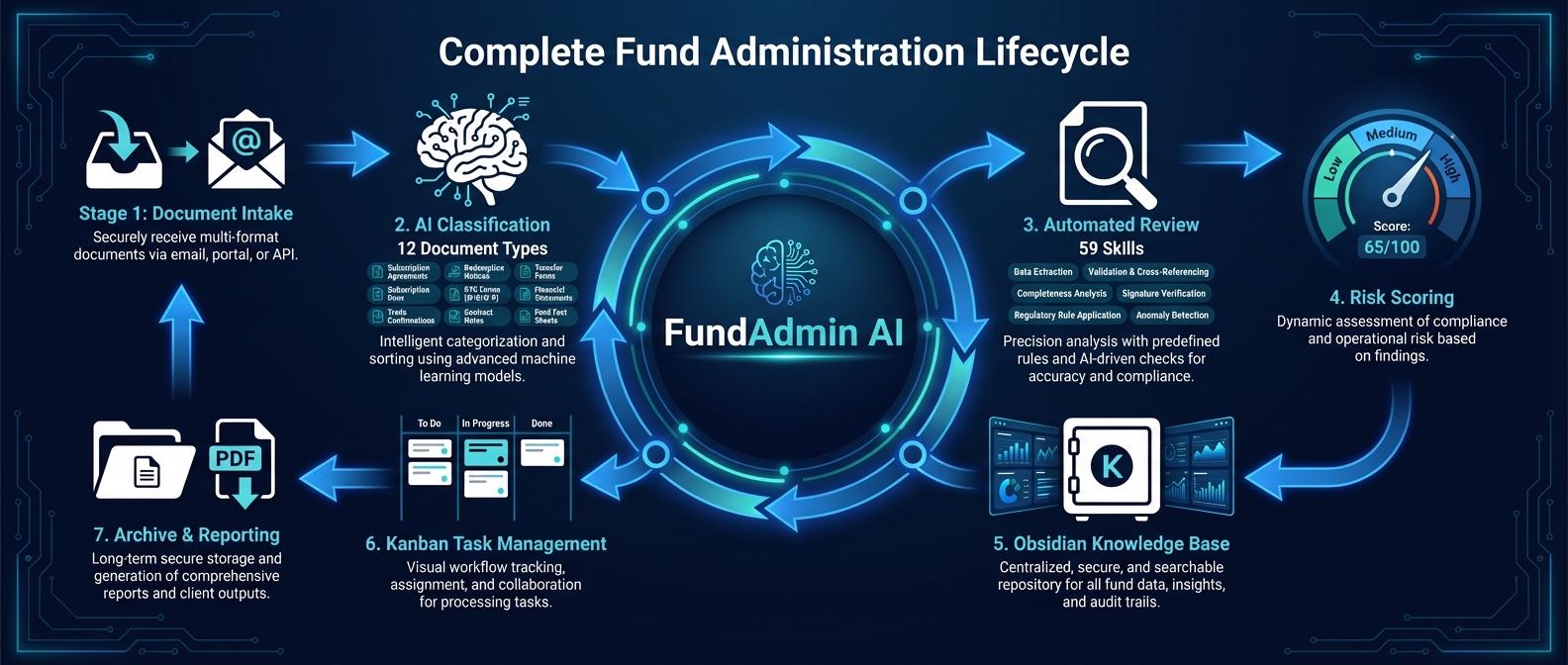
This guide covers the fastest way to install FundAdmin AI, verify the install inside Claude Code, and keep the package updated or removed later.

What FundAdmin AI installs

FundAdmin AI is shipped as a Claude Code add-on, not as a standalone CLI.

The installer copies project assets into these locations:

LocationPurpose
~/.claude/skills/fund/Main /fund orchestrator skill
~/.claude/skills/fund-*The 58 task-specific skills
~/.claude/agents/fund-*.mdThe 5 specialist review agents
~/.claude/skills/fund/scripts/Python helper scripts used for report generation
~/.claude/skills/fund/templates/Markdown templates used by the workflows

Prerequisites

Before installing, make sure you have:

RequirementWhy it matters
Claude CodeFundAdmin AI runs inside Claude Code.
A configured Anthropic API keyClaude Code needs model access before any /fund command can run.
Python 3.8+Required for the bundled PDF tooling.
reportlab (recommended)Required if you want /fund report-pdf to render PDFs locally.

Install the optional PDF dependency with:

bash
pip3 install reportlab

Run the installer from your shell:

bash
curl -fsSL https://raw.githubusercontent.com/davendra/fundadmin-ai/main/install.sh | bash

What the installer does:

  1. clones or reads the project source
  2. copies skills into ~/.claude/skills
  3. copies the 5 review agents into ~/.claude/agents
  4. copies bundled scripts and templates for reporting
  5. prints a command summary so you can sanity-check the installed surface

Install from a local clone

Use this when you want to inspect the source first or work from a checked-out branch.

bash
git clone https://github.com/davendra/fundadmin-ai.git
cd fundadmin-ai
bash install.sh

This path is also the easiest way to test documentation changes before release.

Verify the install

Open Claude Code in any working directory:

bash
claude

Then run these commands inside Claude Code:

text
/fund help
/fund review-lpa ./sample-lpa.txt

If the install is healthy:

  • /fund help lists the command groups
  • Claude Code recognizes /fund ... as a valid command namespace
  • review-lpa attempts to read the file you passed rather than saying the command is unknown

Create a quick smoke-test file

If you do not already have a fund document handy, create a small local text file before opening Claude Code:

bash
cat > sample-lpa.txt <<'EOF2'
Limited Partnership Agreement
Fund: Example Growth Fund I, L.P.
Management Fee: 2% of committed capital during the investment period.
Carried Interest: 20% after return of capital and an 8% preferred return.
Reporting: Quarterly reports within 45 days and audited financials within 90 days.
Key Person: If two of the three named executives cease active involvement, the investment period pauses.
Transfers: Limited partners may not transfer interests without GP consent.
EOF2

Then use it from Claude Code:

text
/fund review-lpa ./sample-lpa.txt
/fund benchmark ./sample-lpa.txt
/fund plain-english ./sample-lpa.txt

Update FundAdmin AI

The installer is idempotent, so the simplest update path is to run it again:

bash
curl -fsSL https://raw.githubusercontent.com/davendra/fundadmin-ai/main/install.sh | bash

If you installed from a local clone and want to track the repository directly:

bash
cd fundadmin-ai
git pull
bash install.sh

Uninstall

If you still have a local clone, run:

bash
cd fundadmin-ai
bash uninstall.sh

If you do not have the repo locally, fetch the uninstall script directly:

bash
curl -fsSL https://raw.githubusercontent.com/davendra/fundadmin-ai/main/uninstall.sh | bash

The uninstaller removes the FundAdmin AI skills and agents from your Claude Code directories and leaves the rest of your Claude Code setup untouched.

Common mistakes

Running /fund ... in your regular shell

/fund commands are meant for the Claude Code prompt, not your shell prompt.

Use this pattern:

bash
claude
text
/fund help

Expecting generate_sample_lpa.py after quick install

The one-line installer copies the skills, agents, templates, and report scripts, but it does not install the repository's sample-generator script into your current working directory. Use your own fund document or create the small sample-lpa.txt file shown above.

Forgetting the PDF dependency

/fund report-pdf depends on Python plus reportlab. If the markdown workflows work but PDF generation does not, install the dependency and retry:

bash
pip3 install reportlab

Installing successfully but verifying in the wrong directory

FundAdmin AI reads local files relative to the directory where Claude Code is running. Start Claude Code in the folder that contains your test document, or pass an absolute path.

Set up the Obsidian vault (optional)

FundAdmin AI can write all review outputs into a local Obsidian vault with Dataview dashboards, Kanban boards, and a full review lifecycle tracker.

Initialize the vault from inside Claude Code:

text
/fund vault-init

This creates ~/FundAdmin-AI-Vault/ with 7 dashboards, 9 Kanban boards, and 12 review subfolders. After reviews are run, sync them into the vault with:

text
/fund vault-sync

Set up the MCP server (optional)

The MCP vault server exposes 15 tools so Claude can read and write your vault in real time — no manual sync required.

Install it once from your shell:

bash
claude mcp add fundadmin-vault -s user node ~/.claude/skills/fund/mcp-vault-server/index.js

After installation, MCP tools like vault_write_review, vault_add_kanban_card, and vault_search are available automatically during any /fund session.

This tool does not provide financial, legal, or tax advice.